• A leader in the test & measurement space
  • Audio Analyzers & Testing by Audio Precision
  • GRAS Sound and Vibration
  • imc Test & Measurement GmbH - productive testing
imc Test & Measurement GmbH
GRAS
  • Tuotteet
    Mittauslaitteet
    • imc ARGUS<em>fit</em>
    • imc CRONOS<i>flex</i>
    • imc CRONOS<em>compact</em>
    • imc CRONOS-XT
    • imc CRONOS-SL
    • imc C-SERIES
    • imc SPARTAN
    • imc EOS
    • imc BUSDAQ
    • imc CANSAS
    Anturiratkaisut
    • 6-komponentti rengasvoima-anturi
    Telemetria
    • Dx
    • T1
  • Mittausohjelmat
    imc FAMOS - data analysis framework
    imc STUDIO - Mittausohjelmisto
    imc WAVE - NVH analysis
    • imc WAVE vibration
    imc LINK - Mittaustiedon siirto
  • Sovellukset
    Teollisuus
    • Ilmailu- ja avaruustekniikka
    • Energia ja sähköverkot
    • Koneet ja laitokset
    Yleiset ratkaisut
    • Kestävyysmittaus
    • Fieldbus Integration
  • Latauskeskus
    Messut & Näyttelyt
    Tuotelataukset
    • Mittauslaitteet
    • Mittausohjelmat
    • Anturiratkaisut
    Uutiset & Tapahtumat
    • Uutiset
    Tiedotteet
  • Palvelut & Koulutus
    Asiakaspalvelu
    Huolto
    • Laitteen lähettäminen huoltoon
    Yritys
    • Keitä olemme?
    • Laadunvarmistus
  • Contact
    • imc Worldwide
    • +44 7985564945
  • English
  • Deutsch (de)
  • Chinese (Simplified)
  • South Korean
  • French
  • Hungarian
  • Chinese (Traditional)
  • Finnish
  • Spanish

Axiometrix Solutions Family

  • Axiometrix Solutions
  • Audio Precision
  • GRAS Sound & Vibration
  • imc Test & Measurement
  • English
  • Deutsch (de)
  • Chinese (Simplified)
  • South Korean
  • French
  • Hungarian
  • Chinese (Traditional)
  • Finnish
  • Spanish
LOG IN | SIGN UP
  1. imc-tm.fi
  2. Mittausohjelmat
  3. imc STUDIO - Mittausohjelmisto
  4. imc STUDIO Panel

imc STUDIO Panel

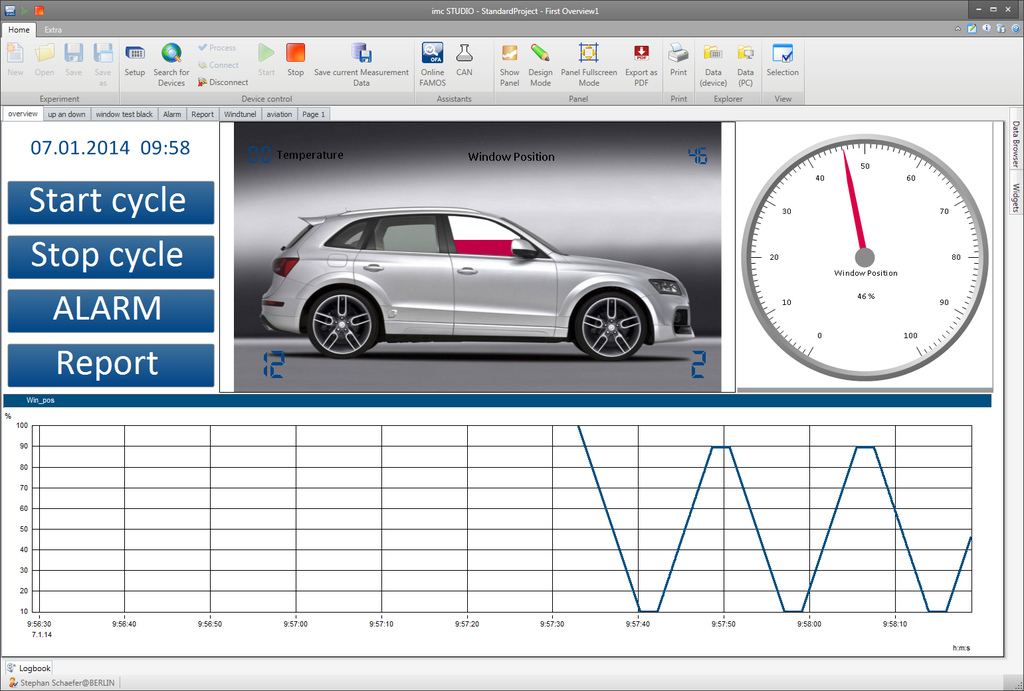
imc STUDIO Panel ermöglicht es eigene Bedien- und Anzeigeoberflächen per Mausklick zu erstellen
  • Pre-defined templates for easy visualization
  • Placement of input and output elements
  • “Widgets” per drag & drop: library of more than 100 pre-defined display and control elements
  • Real-time data & video display
  • 2D and 3D data viewing in imc Curve Window
  • User interface panel and/or a dynamic test report
  • Export & snapshot displays as graphics or PDF
  • Replay function of combined data and video recording
  • Navigation bar for precise manual zoom and inspection across multiple, synchronized imc Curve Windows
  • Linking script execution with push-button widgets

Data visualization

In order to graphically display data, simply select the desired channel from the channel list. Then use drag & drop to place it on the Panel and select the display style. All aspects of the data organization, buffering, connection with the hardware, sampling rates, etc., are initiated automatically, thus allowing you to concentrate entirely on designing and organizing your Panel pages.

The imc Curve Window offers an extensive scope of 1D, 2D and 3D display options, as well as a variety of interactive graphical elements such as:

  • Speedometers and measurement clocks
  • Various display widgets
  • Status-indicator lights
  • Switches and buttons
  • Potentiometers and slider controls
  • Decade potentiometers and odometers
  • Lists and tables of all types for input and output
  • Display of live videos

Widgets for user interaction

Besides offering display-oriented widgets, imc STUDIO Panel supports user interaction with the measurement system: potentiometers, numeric and text input boxes, selection list boxes and controls simulate a conventional command center, or a cockpit so to speak, to allow intuitive handling.

The user’s ability to interact with the measurement process is not limited to such simple actions as “Start Measurement” or adjusting individual parameters. With full access to all of imc STUDIO’s functions, it is possible to control every aspect of the measurement and testing process via the Panel. Whether configuring the measurement, data acquisition, analysis or documentation: everything can be controlled directly by means of imc STUDIO Panel’s operating widgets. This means that you can use the imc STUDIO toolbox to create customized operating and display software for your measurement task.

A custom operating and display interface

The Panel-pages created using imc STUDIO represent your personal operating and display interface for the connected measurement system. It is even possible to create large numbers and varieties of Panel-pages within a single project or single measurement configuration. The individual Panel-pages can be displayed on command either manually by means of tabs, or by means of control widgets. Furthermore, the system can be programmed to automatically display particular pages, for instance, governed by a trigger, or in response to a certain system status, or within an automation sequence by means of the imc STUDIO Sequencer.

Free demo version

Related Links

  • Overview: imc STUDIO
  • What's new in imc STUDIO
  • Benefits imc STUDIO
  • Editions imc STUDIO

Esite

imc STUDIO (PDF)


  • imc STUDIO Setup
  • imc STUDIO Panel
  • imc STUDIO Sequencer
  • imc STUDIO Automation
Data Acquisition Systems Measurement Software Sensor Solutions Telemetry Test Stands
FAMOS imc STUDIO imc WAVE imc LINK
FAMOS FAMOS 2026 + AI FAMOS Resources Prices & Editions Try FAMOS
Industries General Applications Automotive Applications
Knowledge Center imc Academy App Notes Whitepapers Tradeshows & Events Webinars Measurement Software News Press Export Declaration
Customer Service System Service Contact Sales General Contact Become a Partner Locations
About imc About Axiometrix Solutions Company Profile CAEMAX KMT Careers Quality Assurance Terms & Conditions Facts
Axiometrix Solutions Logo negativ
imc Test & Measurement GmbH is a German manufacturer of data acquisition systems, measurement software, telemetry solutions, and test bench automation. Headquartered in Berlin, imc helps engineers acquire, analyze, and manage measurement data for research, development, and production testing. As part of Axiometrix Solutions, imc supports customers in the automotive, rail, aerospace, energy, and mechanical engineering industries through a worldwide network spanning Europe, the United States, and Asia.

© imc Test & Measurement GmbH. All rights reserved.

Legal Notice Privacy Policy REPORT AN INCIDENT
Follow Us:
↑
Loading